
The build-versus-buy debate is usually framed incorrectly. The question is not whether custom software is better than SaaS. The question is which part of the workflow is commodity, which part is strategic, and where the business is currently losing time, money, or control.
Short answer
Buy commodity workflows. Build or customize strategic workflows. Combine when a SaaS tool handles the standard parts but your advantage depends on a process the tool cannot model. The right answer is often a hybrid: SaaS for the foundation, custom software for the differentiating layer, and automation between them.
Decision matrix
| Situation | Best choice |
|---|---|
| Standard accounting, payroll, basic CRM | Buy |
| Unique pricing, routing, quoting, or operations | Build/customize |
| Early-stage process not validated | Manual or low-code first |
| Compliance-heavy core workflow | Buy mature system or build with expert review |
| Repeated handoff between tools | Automate/integrate |
| Data trapped in spreadsheets | Custom dashboard or data layer |
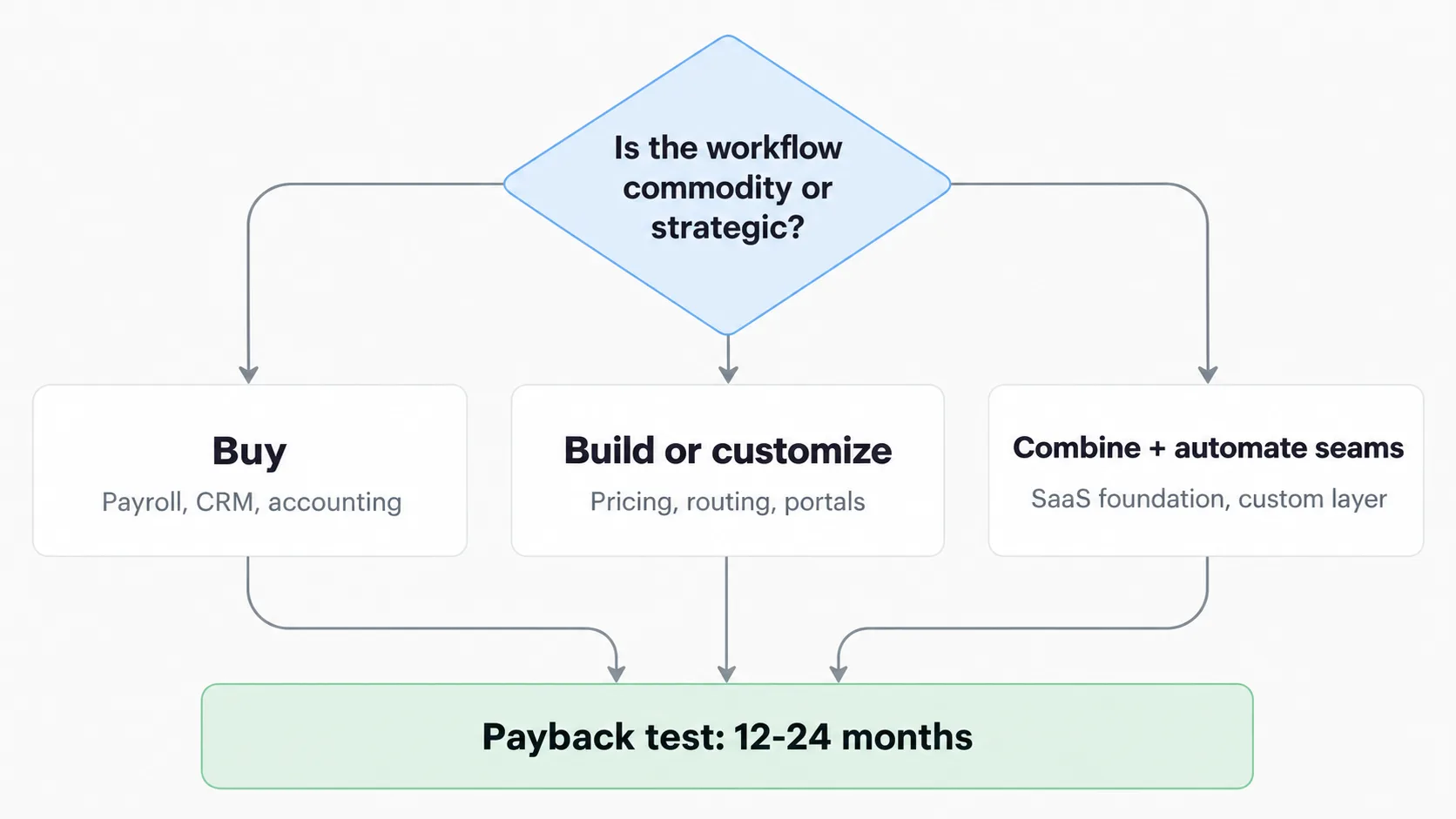
Buy commodity, build differentiating workflows, automate the seams.
When to buy
Buy when the process is common and the market has mature tools. You do not need custom authentication, invoicing, or email marketing unless those workflows are part of your advantage.
Good buy candidates:
- Payroll.
- Basic CRM.
- Email marketing.
- Accounting.
- Generic project management.
- Customer support inbox.
When to build
Build when the workflow is how you win. If your quoting process, logistics routing, marketplace matching, AI review loop, restaurant operations, or custom client portals creates margin or differentiation, forcing it into a generic tool can be expensive.
Build candidates include pricing engines, marketplace logic, restaurant or field operations, and AI-assisted workflows.
- Client-specific portals.
- Pricing engines.
- Marketplace logic.
- Restaurant or field operations.
- AI-assisted workflows.
- Internal tools that remove expensive manual coordination.
When to combine
The hybrid path is often best. Use SaaS for stable commodity infrastructure, then build a custom layer that coordinates data and decisions. See functional AI demos for working examples of that layer.
Examples:
- Stripe for billing + custom subscription dashboard.
- HubSpot for CRM + custom lead scoring and routing.
- Shopify for commerce + custom operations dashboard.
- WhatsApp provider + custom support intelligence.
- POS system + custom restaurant analytics — see restaurant work in portfolio.
Hidden costs
Off-the-shelf tools have hidden costs too:
- Manual workarounds.
- Duplicate data entry.
- Missing reports.
- Per-seat pricing that scales badly.
- Vendor lock-in.
- Integrations that break.
- Processes changed to fit the tool instead of the business.
Custom software has hidden costs:
- Maintenance.
- Documentation.
- Security.
- Hosting.
- Change requests.
- Bus factor if only one person understands it.
The simple test
Ask three questions:
- Does this workflow differentiate the business?
- Is the current process causing measurable cost or lost revenue?
- Can a custom layer pay for itself within 12 to 24 months? If yes, build an estimate to scope it.
If the answer is no, buy. If the answer is yes, build carefully.
The CodeAustral view
The best software strategy is not ideological. It is economic. Use existing tools where they are strong. Build where your business is different. Automate the seams. The companies that win are not the ones with the most custom code; they are the ones with the least operational friction.